
Campaign FAQ
Q: I don’t want to create a multi-stage campaign, how do I create a normal or single prompt campaign?
A: You can create a single stage campaign by adding 1 audience and 1 stage to the campaign builder. This will serve the campaign with the same functionality in Hum’s original Live Engagement Campaign feature.
Q: Can I add stages/touchpoints to previously built campaigns?
A: Yes, you can update any previous campaign to be a multistage campaign.
Q: Where is the “Save As” button?
A: The save as button has been deprecated and replaced with touchpoint templates which allow you to reuse touchpoint configurations in any campaign.
Q: What is campaign priority?
A: In cases where multiple campaigns are set to display to a user who matches multiple target segments on the same page, Hum chooses which campaign to display by weighing the conversion rate and priority you assign. The higher the priority on a campaign, the more likely it is to be displayed to the user.
Hum uses the Multi-armed bandit method to decide which campaign is displayed to a user.
Q: Which touchpoint is served if there are more than 1 per stage?
A: By default, we use Multi-armed bandit to decide which touchpoint to show. The algorithm accounts for your campaign priority, stage priority (stages further in the campaign take higher priority), and performance.
For Stage 1 you can change this by updating the Audience Distribution, Read more about Audience Distribution here.
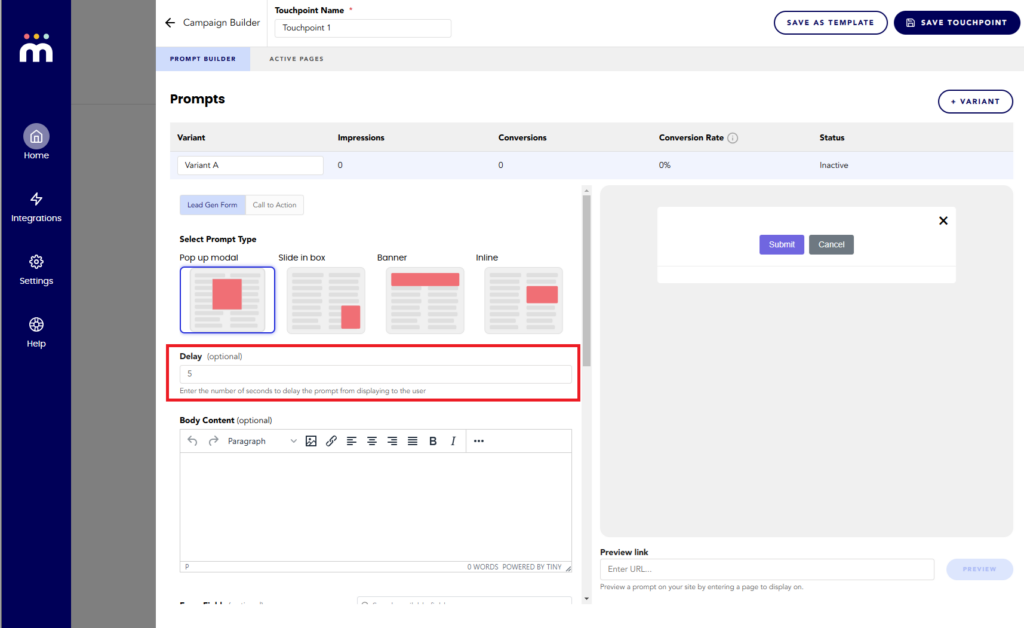
Q: Where do I set the delay?
A: The delay field can be set in Touchpoints
Q: Can I delete a touchpoint?
A: Yes if the campaign is a draft, scheduled, or finished.
If the campaign is Live, you can deactivate the touchpoint but not delete it. This is to prevent data loss & consistent reporting results
Q: Can I delete a stage?
A: This depends on the campaign status & if the stage has touchpoints
Campaigns require at least 1 stage, Stage 1 can never be deleted.
Live, Finished: stages cannot be deleted
Draft, Scheduled: the LAST stage can be removed
Q: Can I segment on people who interacted with this campaign?
A: Yes
Q: Can I use previously built segments in campaigns?
A: Yes
Q: If a profile is in the audience for the campaign, but also in the side loaded segment, which stage in the campaign will they see?
A: They will see the stage they have been “side loaded” to. E.g. If they were side loaded to stage 3, they will see stage 3.
Was this article helpful?
Feedback isn’t a support request. Contact support.