
Audience Distribution
By default, Hum distributes the audience with the multi-armed bandit algorithm, but you can change this to distribute by segments for the Stage 1 of your campaign. If you distribute by…
Understand your audience and deliver the right content to the right readers.
72 guides
By default, Hum distributes the audience with the multi-armed bandit algorithm, but you can change this to distribute by segments for the Stage 1 of your campaign. If you distribute by…
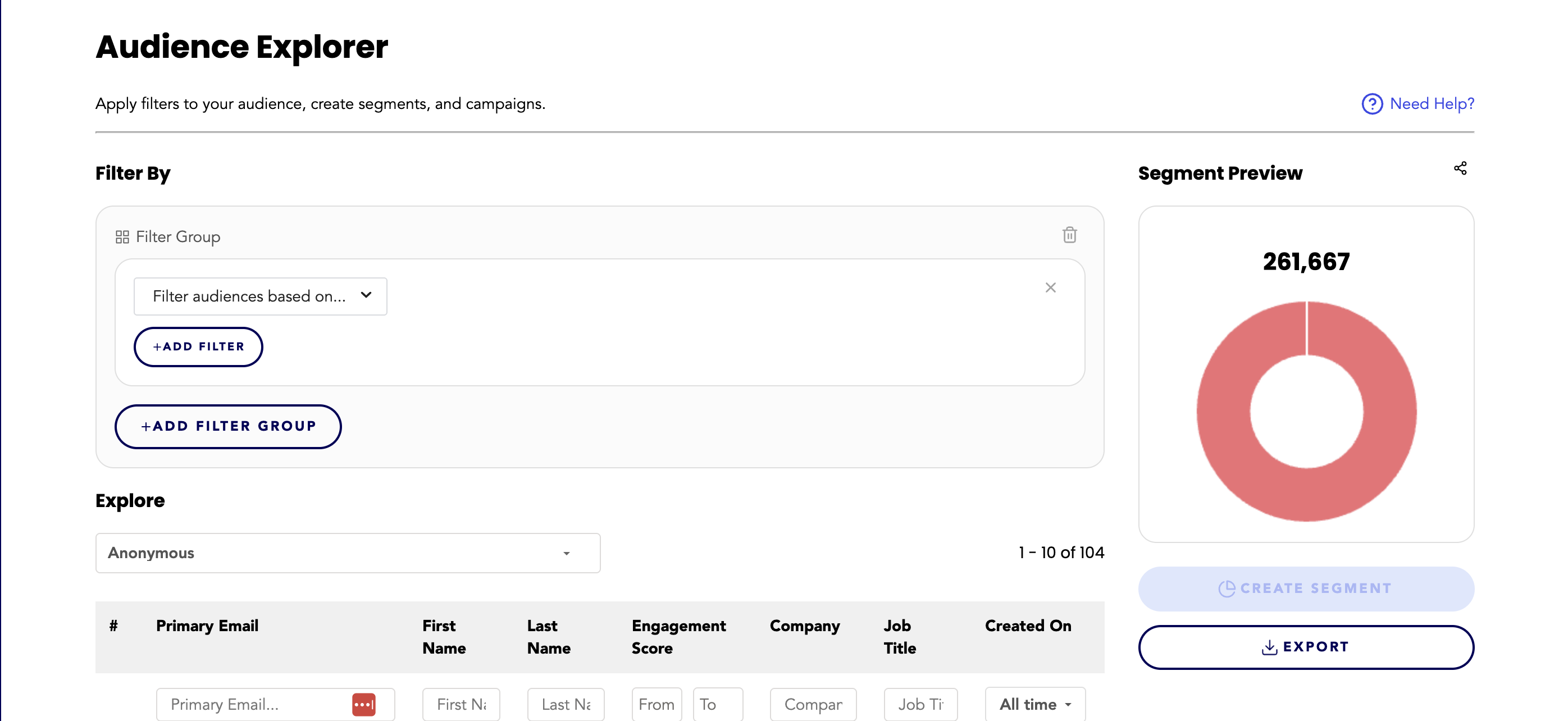
Audience Explorer is where you build, edit, explore, and update segments. Many of the actions and features of the Hum dashboard involve taking action on segments that you build in Audience…
Viewed Article The user clicked on an article but may not have actively engaged with the content (e.g., skimming or exiting quickly). This is typically tracked as a "pageview" or similar…
Audience Explorer is a tool that allows you to easily build audience segments by using a visual human language-based filter builder, a live updating segment preview, and live updating…
Introduction The Connected Profile Growth report offers insights into the expansion of connected profiles over time. These profiles consist of individuals for whom we have an email address…
Within Hum, there are 4 main categories used throughout the dashboard that are broadly applied to help understand your audience. Total Audience Total audience represents the total anonymous…
An audience profile is a current, complete, 360-degree view of a person in your audience. You can view every audience profile in the Hum dashboard. Let's look at an example audience profile…
Customize the weight of actions profiles take with your content This is an advanced setting that allows admin users in the Hum dashboard to customize the weight of actions that contribute…
"Does Hum filter out bot traffic?" We divide bots into two kinds: good bots and bad bots. The good bots use user agents that announce themselves so we are able to block them from firing…
Best Practices Campaign Settings Access to these settings default to Admins only, but access is customizable through Role Base Access Control. Adjust Max Prompt Settings - The new Max…
Q: I don’t want to create a multi-stage campaign, how do I create a normal or single prompt campaign? A: You can create a single stage campaign by adding 1 audience and 1 stage to the…
In cases where multiple campaigns are set to display to a user who matches multiple target segments on the same page, Hum chooses which campaign to display by weighing the conversion rate…
A collection is a grouping of content profiles in Hum, based on filters you apply. Collections can be built using Content Explorer. They can contain a combination of metadata, performance…
Content Explorer is where you build, edit, explore, and update collections. Content explorer is the content parallel to audience explorer. This tool allows you to filter content by Content…
Content Explorer is a tool that allows you to easily build content collections by using a visual human language based filter builder, a live updating collection preview, and live updating…
There are many different metrics on content profiles to help inform how people are interacting with content in a more detailed way. The most common metrics you will see on content profiles…
The Profiles tab will bring up a large list of content profiles. These profiles will default to being sorted by engagement score, but can be sorted by any of the columns by clicking the…
On this page, you can select how you want fields displayed on content profiles. These are able to be fully customizable and can be added, edited, and deleted as desired. These fields are…
Hum Cookie Consent Policy Description Which type of cookie should Hum be categorized as? Most customers put us in the Analytics or Marketing categories of cookies/services, but that is a…
Introduction Introducing our updated Live Engagement lead generation forms! You can now choose and customize any demographic field within Hum, including new fields, for your campaign forms.…
As of January 16, 2024 the following tables have been updated: Segments Collections Campaigns Widgets Updates Include: The ability to customize which columns you want to see in the table…
The Data Upload tab allows you to manually upload Audience Profiles and events to the Hum CDP. You can upload 5 different types of data. User Information Event Registration Event…
About Display Ad Campaigns: This campaign allows you to easily target your display ads to specific audience segments. You can also specify which pages on your website you want these ads to…
What is an engagement score? The engagement score is a calculation of all interactions from your audience with your content. Each action is weighted and contributes to the overall score.…
Flow Control is part of Live Engagement Campaign multi stage campaign functionality. Learn more about campaigns here. What is Flow Control? Time-based controls that allow you to automate…
Funnel Best Practices If you haven’t first read the Live Engagement Campaign Best Practices, please start there. In that document, we lay out our recommendations for individual campaigns…
Use this path to understand Engage’s core building blocks and prepare a first Live Engagement Campaign. Start with a clear audience and a single goal; expand the campaign after you have…
Global Campaign Settings This portion of the dashboard can be accessed by Admins only*, by going to the Settings icon on the left hand navigation, then selecting the Campaigns tab. *Access…
Enabling Hum Personalization on Your Website This guide will help you understand how to enable Hum personalization on your website by integrating a JavaScript snippet. This integration…
Overview As a website admin using Hum, you have the ability to subscribe to dataLayer events which notify you of significant changes or actions that Hum undertakes. This allows you to…
When you first log in to your Hum instance, you will arrive on the overview tab of the home page. This page will show you high level metrics for audience and content. From here, you can…
Want to build off an existing segment? Follow these steps 1. Click on AUDIENCE 2. Click on SEGMENTS 3. Click on the segment you want to build off of 4. Make your adjustments in the filter…
As you add integrations, the number of profile fields can be overwhelming making it difficult to find specific fields in audience explorer or on a profile. This advanced admin tool allows…
Note: This feature is only available to Admin users. If you need to delete a segment, please contact an admin or ask for your permissions to be updated. 1. Click on AUDIENCE 2. Click on…
Important Note: You can now export audience explorations (filtered audiences that have yet to be saved as a segment) in Audience explorer without having to create a segment. 1. Click on…
Have a large segment that you want to scope down? Check out some examples of how to narrow down a segment. Narrow the interest levels histogram range (i.e. from 75-100 to 85-100) Add in the…
Hum’s live engagement campaign modals use SweetAlert declarative templates & TinyMCE WYSIWYG Editors to generate the modal HTML on your website. To style this modal, you’ll need to add…
In the Prompt Builder, you can customize the Body Content & Footer Content with WYSIWYG editors. This enables advanced formatting options and image upload. For existing campaigns: the…
Track link clicks with UTM links Hum does not show link clicks in campaign reporting but you can still track link clicks by setting up all links with UTM parameters. Setting up UTM links…
Hum's first party cookie approach is that we set a cookie on your company's domains and only share information with other domains that are using your company's instance of Hum. Hum stores a…
The institution name variable is a new feature for Live Engagement Campaign that allows you to create 1 campaign that targets multiple institutions instead of making many copies of the same…
Download the module from https://static.hum.works/downloads/drupal/hum_drupal_7.zip Upload the module: 3. Go to “Extend” (in Drupal admin part) (or https://your_site_url/admin/modules) 4.…
Download the module from https://static.hum.works/downloads/drupal/hum_drupal_9.zip Upload the module to /web/modules/custom/hum_integration folder (You must use the FTP access for it) Go…
Enable Hum’s Service Account appropriate Access Create the Hum Service Role Log in to Ad Manager Go to Admin→Access & Authorization Select the Role Tab Select New Role Add permissions for…
A note before you begin: You'll want to think about how you'd like to trigger the Hum Beacon to fire. If you use Cookie Consent management, you'll want the beacon to trigger based on the…
Install the Hum Beacon To install the Hum Beacon, you will need to update the below script with the following variables apiEndpoint e.g. <client>.hum.works/api/ This will be the same for…
Overview This document provides a step-by-step guide on using the enhanced beacon service to send identifies and events securely with strict type assertions for enhanced data quality.…
For each domain: create a CNAME record pointing to <client>.hum.works from <client>.hum.<clientdomain> Notify your CSX Rep and Hum will then issue a certificate request for…
Download the plugin from https://static.hum.works/downloads/wordpress/hum_cdp.zip Upload and activate plugin Navigate to the Hum Plugin and Click Settings On Settings Page Enter the…
On this page you can set the priority source of your profile fields. This page can be used if you have similar data being pulled in from multiple integrations - you can then set which…
The Overview tab in the Integrations section will give you a snapshot look into what integrations have been completed with Hum as well as the last time data has been pulled in from that…
The JSON editor allows you to create custom rules within Audience Explorer without using the filter builder. We recommend this feature to advanced users with experience editing JSON who…
The Keywords tab will bring up a large list of keywords that have been attributed to all content profiles - this can be either from set taxonomy from your end or the Hum Alchemist taxonomy…
This campaign (previously Lead Gen) makes it easy to boost engagement on your website. With this tool, you can create custom forms and call-to-action prompts that target specific segments,…
We conducted a thorough analysis of 100+ campaigns across multiple publishers using Hum’s Live Engagement Campaigns. We looked at all of the variables across the campaigns (creative, copy,…
There are 2 reports for Live Engagement Campaigns to help you track and monitor campaign success: The individual report, and the cross campaign report. The Individual Report This report…
On this page, you can set global settings for all of your Live Engagement campaigns such as: The maximum number of campaigns to display to a user within a given time frame, Campaign…
The live engagement campaign now has 4 different prompt types: Modal, Slide in box, Banner, and Inline Pop up modal The popup modal is the default prompt type. It displays as an overlay…
We’ve updated this setting to allow for more control over how many prompts can be displayed to a user in different time spans. This allows users to advance through multiple campaign stages…
Profiles Campaign Participants Profiles have interacted with this campaign (including complete conversions). How is this calculated? This metric counts the distinct number of profiles that…
Glossary Active Pages The pages where you want the campaign to appear. Audience The audience is the overall target profile for your campaign, containing target segments. Audience…
We have expanded the Live Engagement Campaign from a single-touchpoint interaction to a multistage campaign, enabling you to nurture your audience toward your goals through multiple…
As of January 31st, 2024 we've implemented a few updates to enhance the usability of our reporting: 🪄Autosave Changes: Changes you make to reports in the dashboard are now automatically…
What is a connected profile? A connected profile, meaning an Audience Profile for which Hum has both behavioral data and an email address, is one of the most important parts of your data…
Introducing Prompt Variants Live Engagement Campaign has expanded to create multiple variations of prompts to see which is most engaging with your audience. How it Works Hum leverages…
Hum’s recommendation widget inserts unstyled HTML into your page's DOM. Use this guide to help style the widget to your needs. To style the widget, you’ll need to add styles into your…
Hum's Recommendation Widget The recommendation widget is an onsite personalized widget that recommends content to your audience based on AI-predicted interests derived from behavioral data.…
Use Segment Control Toggles to decide where a segment can be used across Hum — from analytics to live targeting and integrations. When to use Enable the options that match your workflow.…
A segment is a grouping of audience profiles in Hum, based on filters you apply. Segments can be built using Audience Explorer. They can contain a combination of demographic, behavioral,…
Hum includes the ability to access your data via a Snowflake Secure Data Share in GCP US-EAST4 (Virginia). Please review the schema and contact your CSX Rep to begin connecting.
Touchpoints are the interaction points you create for users. They contain: Prompt builder & active pages Each touchpoint can have Up to 10 Variants Their own active/excluded pages rules…
A campaign may be correctly configured but not eligible to appear for a particular visit. Work through these checks without removing targeting, exclusions, or frequency protections from a…